Description
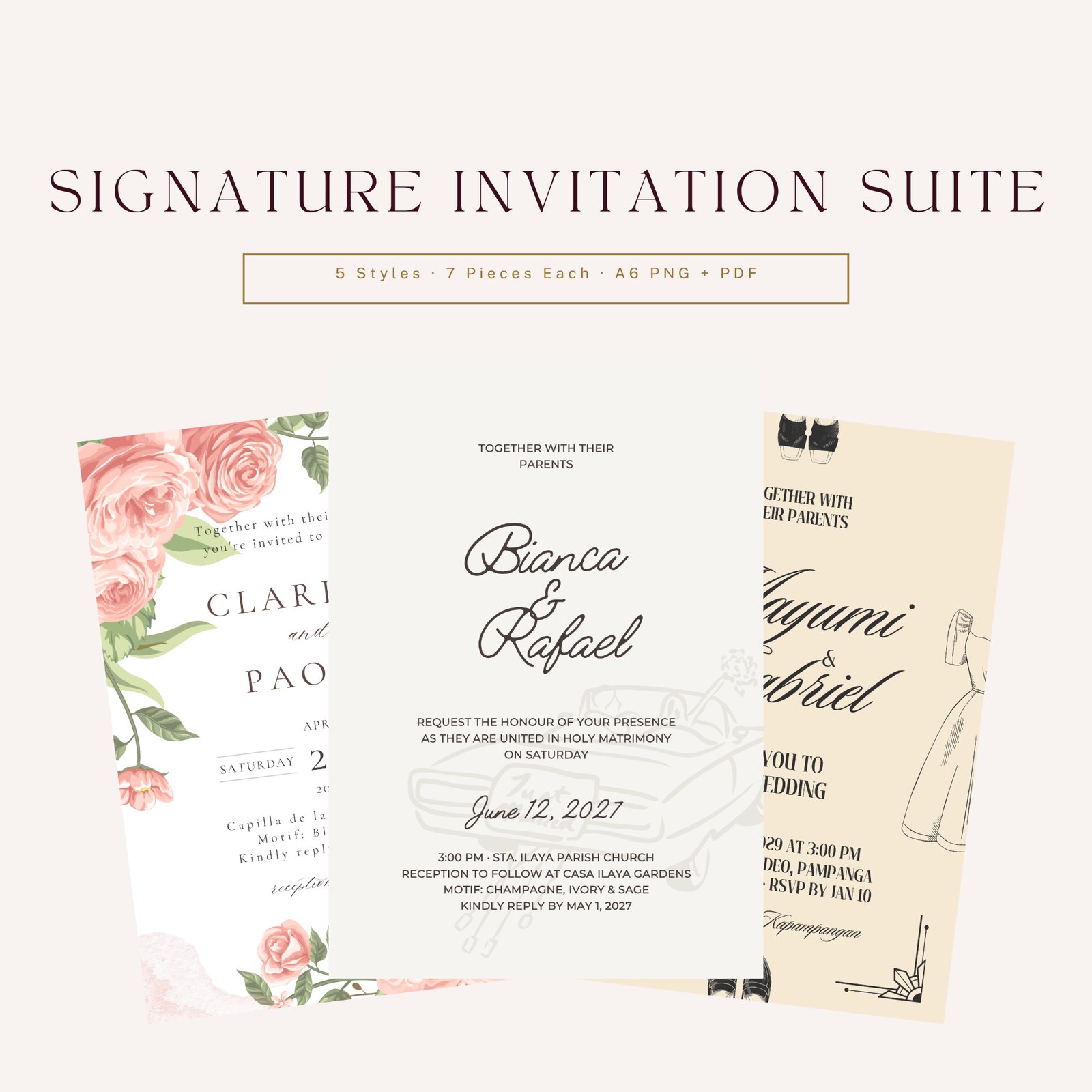
A Filipino wedding needs more than one card. There's the save the date, the main invitation, a details card for the schedule and attire, a card for your entourage, a special one asking your ninang and ninong to be principal sponsors, an RSVP card, and a thank-you card for after. The Signature Invitation Suite shows all seven, designed to match, in five different styles.
Classic Elegant is soft and simple, with flowing script and line art. Modern Minimalist is clean and typographic. Romantic Floral has blush watercolour roses. Neutral Luxury uses a gold arch with leafy line art, and its main invitation has a matching back side. Contemporary Filipino has a barong and terno illustration with a Filipiniana feel. The wording is written for Filipino weddings, from the ninang and ninong card to "Maraming salamat po" on the thank-you card.
Every piece comes with its own Canva template link. Open the link, click "Use template", and Canva gives you your own copy of the design. Replace the example names, dates, venues and RSVP details with yours, then download it as a PDF for printing or a PNG for sharing. The Customization Guide takes you through it step by step. The PNGs and PDFs in the download show made-up example names, dates, venues and phone numbers so you can see the finished look; they aren't your details.
Each piece is A6 (105 × 148 mm). PNGs are 1240 × 1748 pixels; PDFs are A6, one page per side. The designs have no bleed or crop marks and haven't been checked as print-ready, so if you print, ask your printer for a test print and to add bleed.
What's in the download
- Classic Elegant: 7 pieces, PNG + PDF
- Modern Minimalist: 7 pieces, PNG + PDF
- Romantic Floral: 7 pieces, PNG + PDF
- Neutral Luxury: 7 pieces, PNG + PDF, plus the main invitation's back side
- Contemporary Filipino: 7 pieces, PNG + PDF
- 35 Canva template links, one per piece (in a separate links file and in the Customization Guide)
- Read-me
- Personal Use License
- Customization Guide (step-by-step editing in Canva, plus printing tips)
All in one ZIP file.
The seven pieces in every style
Each of the five styles has the same seven pieces:
- Main Invitation (Neutral Luxury: front and back)
- Save the Date
- Details Card
- Entourage Invitation
- Principal Sponsor Invitation (ninang and ninong)
- RSVP Card
- Thank You Card
35 designs in all, 36 sides including the Neutral Luxury back. In Canva, Neutral Luxury pieces 02 to 07 also have an extra monogram back page you can delete or use.
Format and size
Canva template links (edit your own copy in Canva), plus PNG images and PDF files showing the designs with example names and details.
A6, 105 × 148 mm (about 4.1 × 5.8 in). PNG: 1240 × 1748 px. PDF: 297.75 × 419.25 pt. No bleed, no crop marks.
How to use
- Download and unzip the files.
- Open the style folder you like and look through all seven pieces.
- Open the Canva template link for each piece you want and click "Use template" to get your own copy.
- Replace the example names and details with yours, then download as PDF Print or PNG.
- If you print, ask for a test print first, since the designs have no bleed and haven't been checked as print-ready.
Who it's for
- Couples planning a Filipino wedding who want to choose a stationery style
- Couples who want a full matching set, including entourage and ninang and ninong cards
- Couples who want to edit their own invitations in Canva
- Coordinators helping a couple pick an invitation look (for that couple's own wedding)
FAQ
Can I change the names and details? Yes, in Canva. Each piece has a template link. Open it, click "Use template" to get your own copy, and type over the example details. The names and details in the download are fictional examples.
Do I need Canva? Yes, to edit. You'll need a Canva account to open the links; a free account is enough to sign in and get your copy.
Do I get every piece as a template? Yes. All 35 pieces have their own link, listed by style and piece.
Are they print-ready? They haven't been checked as print-ready. They're A6 with no bleed or crop marks. Ask your printer for a test print and to add bleed if the cards will be trimmed. When you download from Canva, choose PDF Print.
What size are they? A6, 105 × 148 mm. Four fit on an A4 sheet.
Can I share the PNG with guests online? Yes, for your own wedding. Edit your copy in Canva first, since the example details in the files aren't yours.
Can I mix pieces from different styles? Yes, for your own wedding.
I need help. Who do I contact? Email support@wedplanner.ph.
License
Personal use only, for one couple's own wedding. You may edit your own Canva copies, and use, share and print the designs for your own wedding, and have a print shop or coordinator prepare them for you. You may not resell, share, upload or give away the files or template links, or use the designs in products or services for others. All designs remain the property of WedPlanner PH.