Description
A wedding magazine gives your guests something to read while they wait, and gives you a keepsake to hold on to. This one is written for Filipino weddings: there's a page for your ninang and ninong, one for the veil, cord, coin and candle sponsors, the symbols of the candles, veil and cord and the arrhae, an Order of the Mass, and a page for Lolo and Lola.
The 40 pages walk through the whole day. It opens with a welcome and your story: how you met, how you fell in love, and the proposal. Then come the ceremony, the readings and your vows, followed by your parents, the entourage, the bridesmaids, the groomsmen and the little ones. At the reception there's the programme, menu, seating, suppliers, first dance, toasts and games. To finish, there are words of wisdom, a getting-to-know-us Q&A, a full-page photo spread, a photo grid, a hashtag and QR page for shared photos, a thank-you, a love letter and a page where guests can leave you a note.
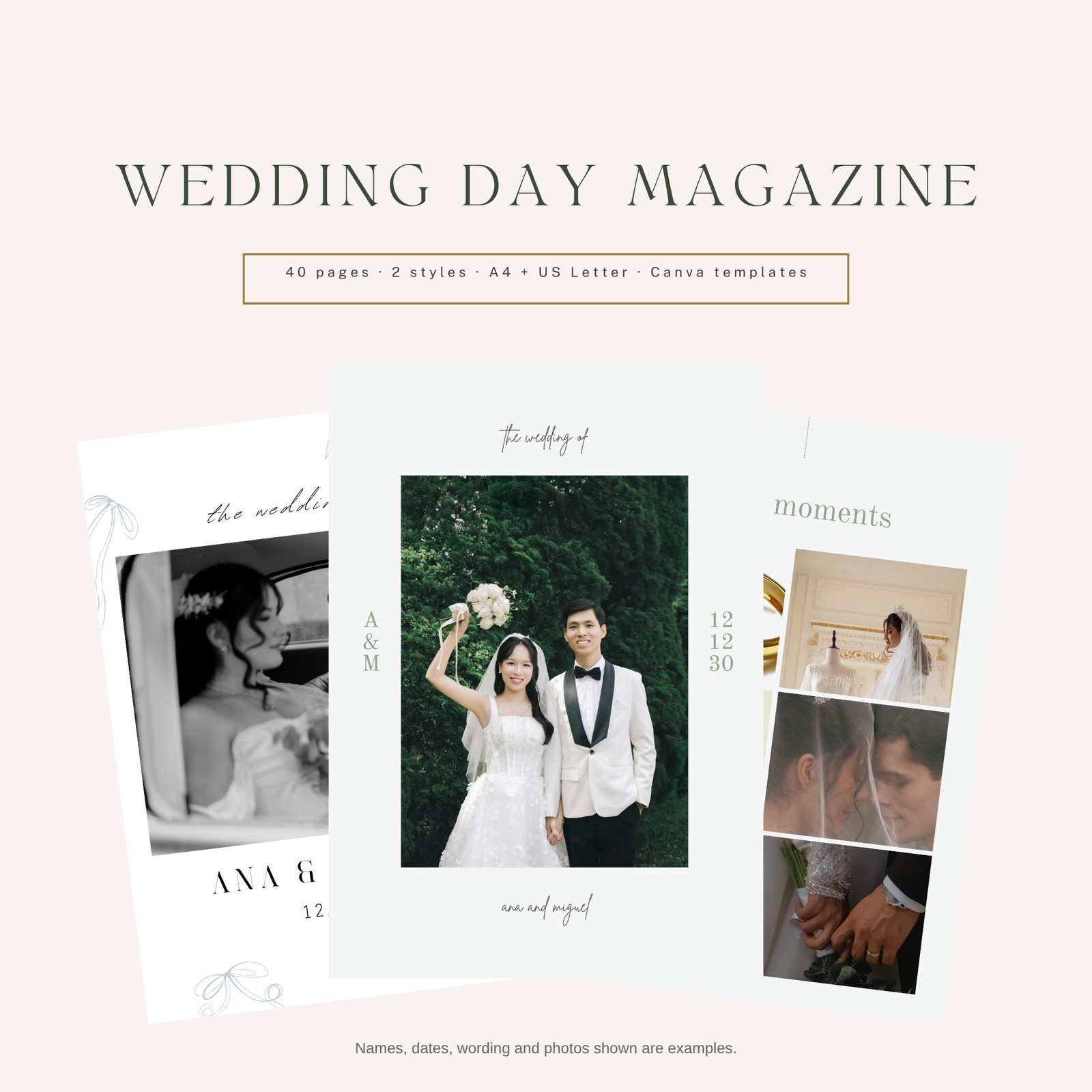
Choose from two styles. Sage Editorial has soft sage green and grey on an off-white page, serif headings with a handwritten script line, colour photos. Black & White Bows has crisp white pages, black script titles, hand-drawn pale-blue bows and black-and-white photos. Every photo spot already holds a stock photo so you can see the finished look, and you swap in your own by dragging it onto the photo.
You get four Canva template links: each style in A4 and in US Letter. Open a link, click "Use template", and Canva gives you your own copy of all 40 pages. The Customization Guide walks you through changing the text, replacing photos and printing. The PDFs in the download show example names (Ana Bautista & Miguel Lim, 12 December 2030), example wording and stock photos of models; they aren't your details.
The pages have no bleed or crop marks and haven't been checked as print-ready, so if you print, ask your printer for a test print. The Order of the Mass and readings are a common Catholic outline; please check them with your parish.
What's in the download
- Sage Editorial: 40-page magazine as PDF, A4 and US Letter (example content)
- Black & White Bows: 40-page magazine as PDF, A4 and US Letter (example content)
- 4 Canva template links (2 styles × 2 sizes), in a links file and in the Customization Guide
- Customization Guide (editing in Canva, replacing photos, printing tips)
- Photo Notes (every photo spot, page by page, with sizes)
- Read-me
- Personal Use License
All in one ZIP file.
The 40 pages
Both styles have the same 40 pages:
- Cover
- Welcome
- Contents
- Meet the Couple
- Our Love Story
- How We Fell in Love
- The Proposal
- The Details
- The Ceremony
- Order of the Mass (1)
- Order of the Mass (2)
- The Readings
- Our Vows
- The Symbols (candles, veil & cord, arrhae)
- Principal Sponsors
- Secondary Sponsors
- Our Parents
- Meet the Entourage
- The Bridesmaids
- The Groomsmen
- The Little Ones
- Special Thanks
- The Reception Programme
- The Menu
- Find Your Seat
- The Dream Team (suppliers)
- Our First Dance
- The Toasts
- Let's Play (games)
- Words of Wisdom
- Getting to Know Us (Q&A)
- From Our Families
- Photo Spread (full page)
- Little Moments (photo grid)
- Lolo & Lola
- Share the Love (hashtag & QR)
- Thank You
- A Love Letter
- Leave Us a Note (guest messages)
- Back Cover
Format and size
Canva template links (edit your own copy in Canva), plus PDFs showing the finished magazine with example content.
- A4: 210 × 297 mm, portrait
- US Letter: 8.5 × 11 in, portrait
- No bleed, no crop marks.
4 PDF files (2 styles × 2 sizes, 40 pages each), a text file with the 4 Canva template links, plus the read-me, license, customization guide and photo notes, delivered together in one ZIP file.
How to use
- Download and unzip the files.
- Look through the PDFs and pick a style and size.
- Open that Canva template link and click "Use template" to get your own copy.
- Replace the example text and photos with yours, page by page.
- Download as PDF Print. If you print, ask for a test print first, since the pages have no bleed and haven't been checked as print-ready.
Who it's for
- Couples planning a Filipino wedding who want a keepsake magazine or programme for guests
- Couples with a church wedding who want the Order of the Mass, sponsors and entourage in one booklet
- Couples who want to edit their own magazine in Canva and add their own photos
- Coordinators preparing a magazine for a couple's own wedding
FAQ
Can I change the text and photos? Yes, in Canva. Open a template link, click "Use template" to get your own copy, type over the example text and drag your own photos onto the photo spots.
Do I need Canva? Yes, to edit. A free Canva account is enough to open the links and get your copy.
Are the photos included? Each photo spot holds a Canva stock photo so you can see the finished look. They're there to be replaced with your own photos. Some may be Canva Pro photos; if one shows a watermark in a free account, swap it for your own.
Is it print-ready? It hasn't been checked as print-ready. There's no bleed and no crop marks. Ask your printer for a test print, and to add bleed if the pages will be trimmed.
Can I remove pages? Yes. Delete any page you don't need in your Canva copy, then update the Contents page.
Is the Order of the Mass correct for my church? It's a common Filipino Catholic outline and an example. Check the order, readings and names with your parish.
Can I send it to guests as a PDF? Yes, for your own wedding.
I need help. Who do I contact? Email support@wedplanner.ph.
License
Personal use only, for one couple's own wedding. You may edit your own Canva copies, print and share your magazine for your own wedding, and have a print shop or coordinator prepare it for you. You may not resell, share, upload or give away the files or template links, or use the designs in products or services for others. Stock photos are covered by Canva's license. All designs remain the property of WedPlanner PH.